|
<< Click to Display Table of Contents >> Users |
  
|
|
<< Click to Display Table of Contents >> Users |
|
Users tab of Information Security:
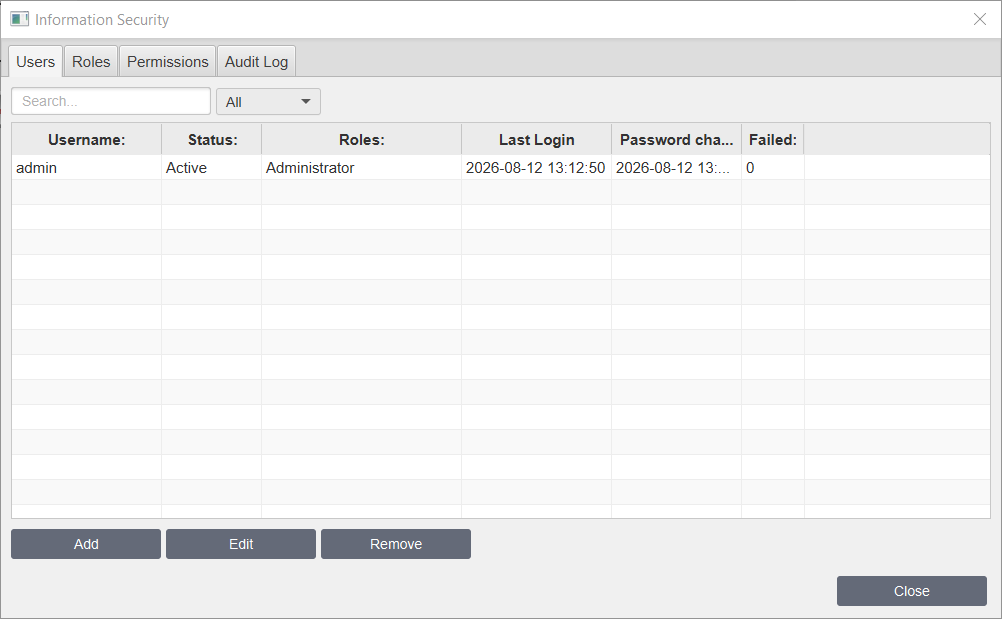
Where:
Property |
Description |
|---|---|
Username |
Name of the user. |
Status |
Status of the user: Active, Locked, Disabled and Expired. |
Roles |
User's roles. |
Last login |
Date and time of the last successful authentication for a user account. |
Password changed |
Timestamp of the most recent password update. |
Failed |
Number of consecutive failed logins since last success or reset. |
By clicking Add, Edit or Remove you can Remove the account or Add or Edit new account:
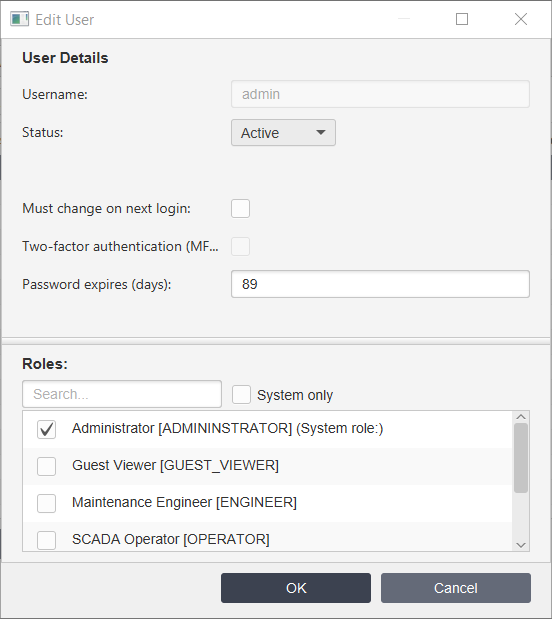
Where:
Property |
Description |
|---|---|
Username |
Name of the user. |
Status |
Status of the user: Active, Locked, Disabled and Expired. |
Must change on next login |
Flag requiring the user to change their password upon their next successful login. |
Two-factor authentication (MFA) |
Enable two-factor authentication for user. |
Password expires (days): |
Indicates when password is expired. |
Roles |
User's roles. |