|
<< Click to Display Table of Contents >> Audit Configuration |
  
|
|
<< Click to Display Table of Contents >> Audit Configuration |
|
Open Audit Configuration tab to setup it:
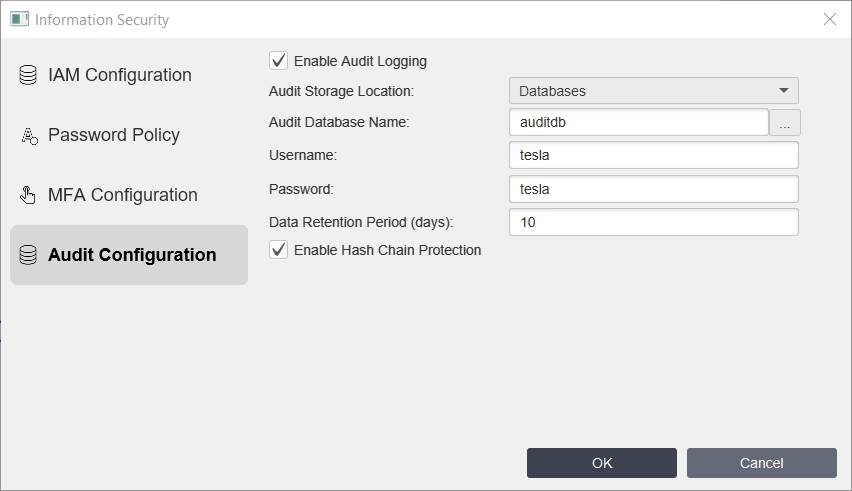
Where:
Property |
Description |
|---|---|
Enable Audit Logging |
Enables tracking of events for security review. |
Audit Storage Location |
Central repository for all system audit logs. |
Audit database name |
The name of the database that stores all Audit information. • If you choose the simple name like auditdb application will create SQLite database in the application directory. •If you choose names beginning with jdbc:mysql: like jdbc:mysql://192.168.0.104:3306/test, where test - name of the database, the application will connect to MySQL database and create audit table. How to install and setup MySQL you can read in MySQL* chapter. •if you choose names beginning with jdbc:postgresql: like jdbc:postgresql://192.168.1.17:5432/test where test name of the database you want to connect, the application will connect to PostgreSQL* database and create audit table. |
Username |
Username for database (except SQLite database). |
Password |
Password for database (except SQLite database). |
Data Retention Period (days) |
How long all audit records are kept before deletion. |
Enable Hash Chain Protection |
Enables cryptographic hash chaining to make audit log modifications detectable. |
Enable Syslog forwarding |
Enable if you want to forward Audit messages to Syslog servers. |
Syslog servers |
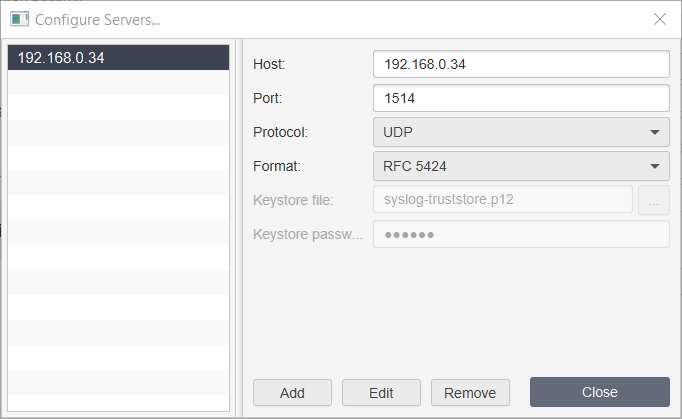
Click Configure Servers if you want to Add, Edit or Delete target Syslog servers:
Where: Host - IP address or Host of the Syslog server. Port - port of the Syslog server. Protocol - choose protocol - TCP, UDP or TLS. Format - format of the syslog messages - RFC5424 or CEF. Keystore file - name of the keystore file. File is located in private folder where installed TeslaSCADA. Keystore password - keystore password.
|