|
<< Click to Display Table of Contents >> IAM Configuration |
  
|
|
<< Click to Display Table of Contents >> IAM Configuration |
|
Open IAM (Identity and Access Management) Configuration tab to setup it:
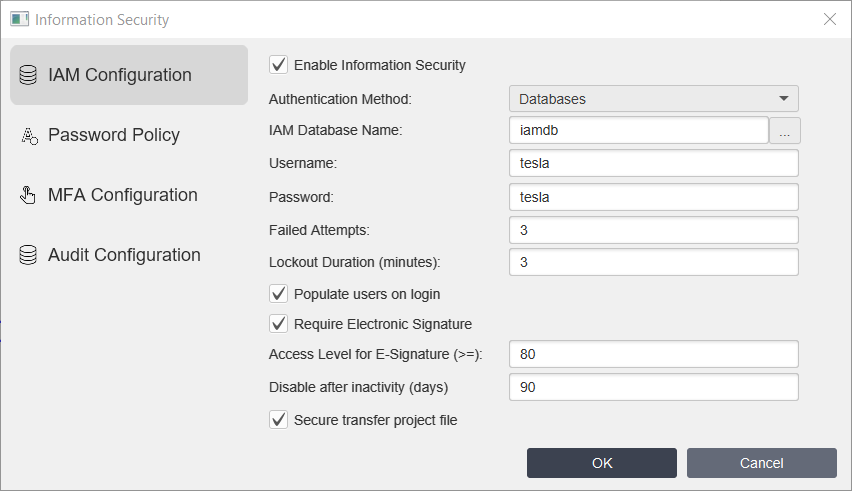
Where:
Property |
Description |
|---|---|
Enable Information security |
Check to enable information security. |
Authentication Method |
Choose Authentication method. At this method only database method is available. When you choose database method all information is stored in local database. |
IAM database name |
The name of the database that stores all IAM (Identity and Access Management) information. Users, roles, permission are stored in this database. • If you choose the simple name like iamdb application will create SQLite database in the application directory. •If you choose names beginning with jdbc:mysql: like jdbc:mysql://192.168.0.104:3306/test, where test - name of the database, the application will connect to MySQL database and create IAM tables. How to install and setup MySQL you can read in MySQL* chapter. •if you choose names beginning with jdbc:postgresql: like jdbc:postgresql://192.168.1.17:5432/test where test name of the database you want to connect, the application will connect to PostgreSQL* database and create IAM tables. |
Username |
Username for database (except SQLite database). |
Password |
Password for database (except SQLite database). |
Failed Attempts |
Failed login attempts allowed before an user is locked out. |
Lockout duration (min) |
Duration of the lockout in minutes. |
Populate users on login |
All users who are already set up will be listed if you check this box. |
Require electronic signature |
Check this if you want to confirm certain actions with an electronic signature. |
Access Level for E-Signatre (>=) |
Access level when an electronic signature is required |
Disable after inactivity (days) |
Disable an account after a specified days of inactivity. |
Secure transfer project file |
Check this if you want to securely transfer the project file from IDE to Runtime. |