Thank you for your replay,
Unfortunatly I didn'understand how can i associate the date
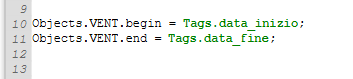
Below I attach the image of my DB, so I suppose to write on ST script:
begin=Tags.start_time;
end=Tags.stop_time;
Correctly?
Thanks, Greetings,
The administrator has disabled public write access.
Set Report Database to specific date
1 year 6 months ago #3277
Thank you for your kind reply,
My database is called DB and the table VENT, so I wrote the code as you see, but it doesn't work.
What did I do wrong? How should I correct it?
Thank you very much
Regards,
The administrator has disabled public write access.
Set Report Database to specific date
1 year 6 months ago #3279
There should be graphical object name (table graphical object name without whitespaces) after Objects. in the script. Please check this moment. It should become orange color of the script text.
Best regards,
Ruslan
The administrator has disabled public write access.
G-day.
OK now I see that the labels are coloured, I set the start and end time, but I didn't understand if I have to add some other line of code to be able to insert those times in the report.
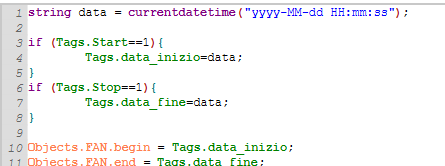
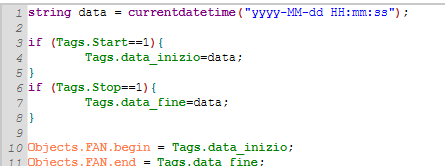
I attach what I have written:
I click this button:
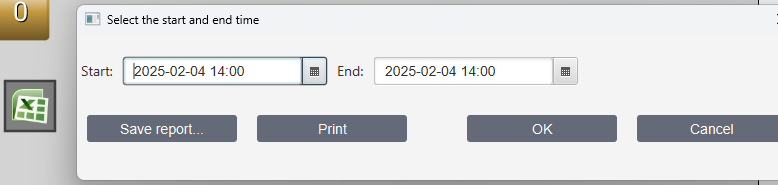
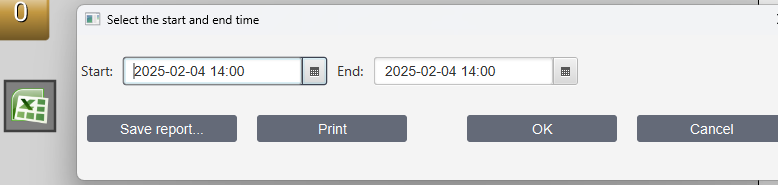
Finally I would like to see the datetime below:
Thank you in advice
Regard
The administrator has disabled public write access.
Set Report Database to specific date
1 year 5 months ago #3284
G-day.
OK now I see that the labels are coloured, I set the start and end time, but I didn't understand if I have to add some other line of code to be able to insert those times in the report.
I attach what I have written:
I click this button:
Finally I would like to see the datetime below:
Thank you in advice
Regard
The administrator has disabled public write access.